Before Run the Job, Create Table (Testtable) with fields MenuItemName, menuItemObject (You can extend with Name).
When you run the below Job data will populate in TestTable.
static void ListOfAllMenuitemsinAOT(Args _args)
{
UtilElements utilElements;
UtilEntryLevel LayerName = UtilEntryLevel::usr;
TreeNode treeNode;
TestTable testTable;
#Properties
#AOT
delete_from testTable;
while select utilElements
where utilElements.recordType == UtilElementType::ActionTool && utilElements.name like "axl*"
// && utilElements.utilLevel == LayerName //for layers filtering
{
treeNode = xUtilElements::getNodeInTree(xUtilElements::parentElement(utilElements));
testTable.MenuItemName = utilElements.name;
testTable.menuItemObject = treeNode.AOTgetProperty(#PropertyObject);
if(testTable.menuItemObject != "")
{
testTable.insert();
}
}
}
Showing posts with label forms. Show all posts
Showing posts with label forms. Show all posts

24 Jun 2015
How and use close method in a form + AX 2012
Called when a form is closed.
when closing a form according to records in a grid of a table we update records in another table.
public void close()
{
ThyProjForcasTable ProjForcasTable;
;
super();
ttsbegin;
while select ProjForcasTable
where ProjForcasTable.ProjId == ThyProjForcasTable.ProjId
{
if (ProjForcasTable.NoYesId == NoYes::No)
{
select forupdate projTable
where projTable.ProjId == ThyProjForcasTable.ProjId;
Projtable.Status = ProjStatus::Created;
Projtable.update();
}
}
ttscommit;
}
when closing a form according to records in a grid of a table we update records in another table.
public void close()
{
ThyProjForcasTable ProjForcasTable;
;
super();
ttsbegin;
while select ProjForcasTable
where ProjForcasTable.ProjId == ThyProjForcasTable.ProjId
{
if (ProjForcasTable.NoYesId == NoYes::No)
{
select forupdate projTable
where projTable.ProjId == ThyProjForcasTable.ProjId;
Projtable.Status = ProjStatus::Created;
Projtable.update();
}
}
ttscommit;
}
17 Feb 2015
Filtering data in a grid based on parameter passed from one form to another form
You need to override the init method of the data source of your form following this way for example:
public void init()
{
SysDimension SysDimension;
;
super();
if( element.args().parm())
{
SysQuery::findOrCreateRange(this.query().dataSourceTable(tablenum(Dimensions)), fieldnum(Dimensions, DimensionCode)).value(queryValue(element.args().parm()));
}
else
{
SysQuery::findOrCreateRange(this.query().dataSourceTable(tablenum(Dimensions)), fieldnum(Dimensions, DimensionCode)).value(queryValue(SysDimension::Department));
}
}
24 Jan 2014
unable to add methods in ListPage
i am able to add and modify and write new contol override method for my customization inside any child form. But if my form is list page form like CustTableListPage, or VendTableListPage then i am able to add buttom but i dont able to override method… so i am lookin on this and finally get answer.. Look at Below…
If you want to use that List Page button only in AX 2012 Client but not in Enterprise Portal then just change button Property “DisplayTarget” and change to “Client”. Now you can override method for that button…
Such a Cool Feature….

Method Override option not available in CustTableListPage

Override Method in CustTable Form

DisplayTarget to client and Override Methods
31 Dec 2013
Adding new fields on list page grid using new data source
Adding new fields on a positions list page grid in payroll module and these fields were coming from a new custom table. The steps are simple with one tricky part:
1. Create new table, define proper relations with other tables.

2. Add the table in the query used on the list page.

3. This is a tricky part: When you come back to list page and try to restore the form you will not be able to see the new data source. To do this right click on the data source node and again define the name of the query. This will reload the new structure from the query.

4. Then you can view the data source which you added in the query and then can drag the fields in the grid.

3 Oct 2013
Passing Args from one Form to another Form in Ax 2012
Step 1: Make one SampleTable which has three fields named (SIno, name, AddressCity).
Step 2: Make FormA with datasource as SampleTable and drag the datasource fields into the design Grid.
Step 3: Drag one button and override the click method and write the following code.
void clicked()
{
Args args;
FormRun formRun;
;
super();
args = new args(formstr(FormB)); // sending Args(record) to FormB
args.record(SampleTable);
formrun = classfactory.formrunclass(args);
formrun.init();
formrun.run();
formrun.wait();
formrun.detach();
}

step 4: Make FormB with datasource as same table for which you take for Form A i.e., SampleTable and drag the fields in to the
Grid of design part.
step 5: write the following code in to the init method of FormB.
public void init()
{
SampleTable _sampleTable;
super();
_sampleTable = element.args().record();
SampleTable_ds.query().dataSourceTable(Tablenum(SampleTable)).addRange(fieldNum(SampleTbl,RecId)).
value(SysQuery::value(_sampleTable.Recid));
}
Step 2: Make FormA with datasource as SampleTable and drag the datasource fields into the design Grid.
Step 3: Drag one button and override the click method and write the following code.
void clicked()
{
Args args;
FormRun formRun;
;
super();
args = new args(formstr(FormB)); // sending Args(record) to FormB
args.record(SampleTable);
formrun = classfactory.formrunclass(args);
formrun.init();
formrun.run();
formrun.wait();
formrun.detach();
}

step 4: Make FormB with datasource as same table for which you take for Form A i.e., SampleTable and drag the fields in to the
Grid of design part.
step 5: write the following code in to the init method of FormB.
public void init()
{
SampleTable _sampleTable;
super();
_sampleTable = element.args().record();
SampleTable_ds.query().dataSourceTable(Tablenum(SampleTable)).addRange(fieldNum(SampleTbl,RecId)).
value(SysQuery::value(_sampleTable.Recid));
}
28 Sept 2013
Set focus on specific control when opening form
override the firstField() method of the form and
set your desired control after super() call.
{ ; super(_flags); desiredControlName.setFocus();}public void firstField(int _flags=1)
23 Aug 2013
“DEPLOY TO EP” – AX Client forms using Menu items in Dynamics AX 2012
Ax client forms can easily be published to enterprise portal by the new feature from the Menu item >> Deploy to EP.
Let me help with an example:
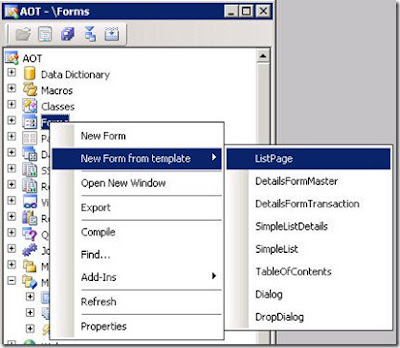
Create a new List Page by using the template option provided in AX 2012 as shown below and name it as SR_EcoProductListPage as shown below
Change the Name of the newly created list page to SR_EcoProductListPage as shown below.
ECOListPage
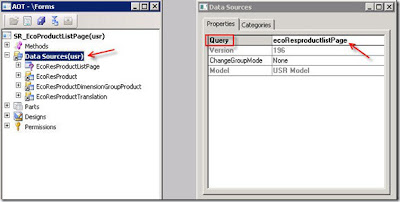
Now, let us use the query property on the data sources property to get the linked data sources from the query
Right click on the Data sources Node >> properties >> set the query property to ecoResProductListPage as shown below
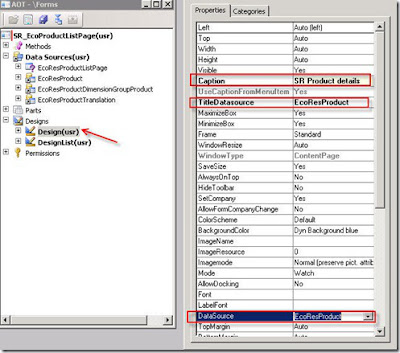
Next, Go to Design Node >> and give the caption, title data source as shown below.
Next, On the grid set the data source as EcoResProduct as shown below.
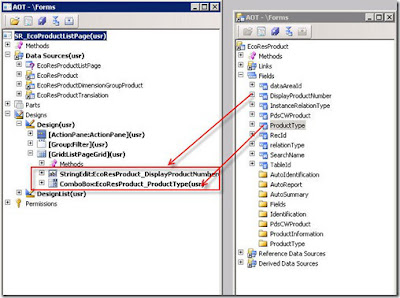
Drag and drop some fields on to grid from the Data sources >> EcoResProduct. I have dragged and dropped DisplayProductNumber and ProductType fields on to grid as shown below.
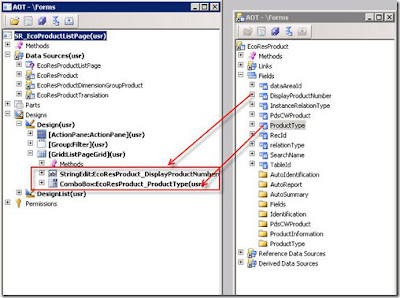
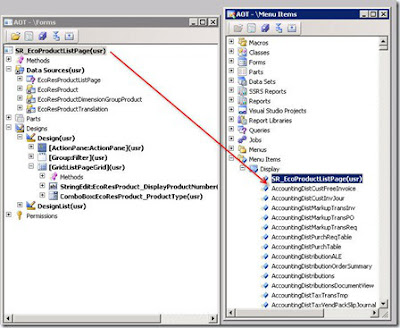
Next, we will add this form to the menu items of type display by dragging and dropping the form to the Menu items >> Display
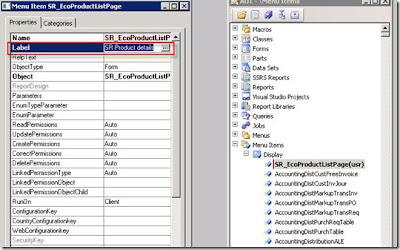
Right click on the newly created menu item and go its properties and set the label as “SR Product details” as shown below.
All you have to do is Right click on the newly created menu item >> chose option “Deploy to EP” as shown below
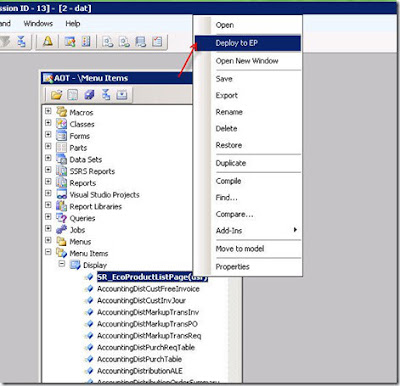
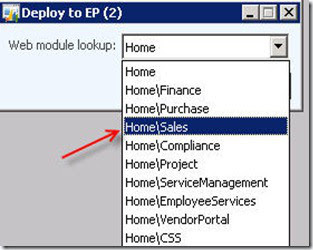
I am going to add this form to Home\sales as shown below and click on Ok button
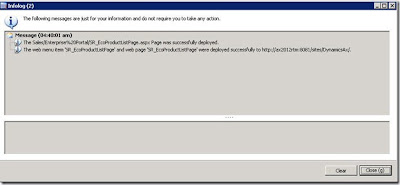
You should get an info log that your aspx has been successfully deployed as shown below.
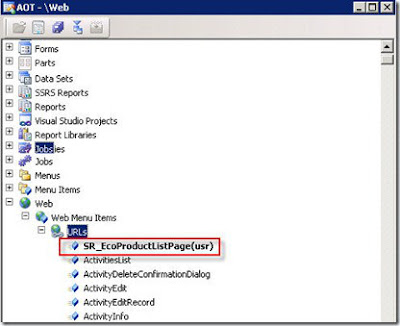
Now, lets go to Web node in AOT and check whether it has created a URL type web menu item as shown below.
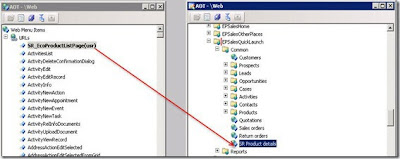
Now lets launch this to Sales quick launch as we have selected Home\Sales earlier.
Go to AOT >> Web node, and expand the Web Menus node.
Then expand EPSalesQuickLaunch >> Common
Drag and drop the SR_EcoProductListPage URL below Return orders as shown below.
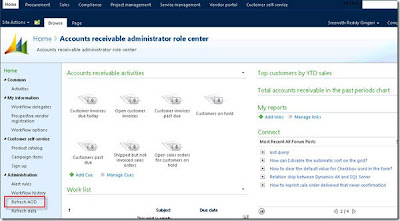
Open the EP Home page > Administration>> Select the option Refresh AOD as shown below
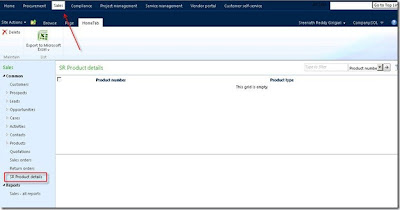
Go to Sales Menu/Tab and you will find SR Product details in the quick launch menu as shown below
This is just an example of how to deploy to EP forms from AX. Please don’t get in to functionalities or business process as the above form is just a sample example without any functionality.
Let me help with an example:
Create a new List Page by using the template option provided in AX 2012 as shown below and name it as SR_EcoProductListPage as shown below

Change the Name of the newly created list page to SR_EcoProductListPage as shown below.
ECOListPage
Now, let us use the query property on the data sources property to get the linked data sources from the query
Right click on the Data sources Node >> properties >> set the query property to ecoResProductListPage as shown below

Next, Go to Design Node >> and give the caption, title data source as shown below.

Next, On the grid set the data source as EcoResProduct as shown below.

Drag and drop some fields on to grid from the Data sources >> EcoResProduct. I have dragged and dropped DisplayProductNumber and ProductType fields on to grid as shown below.

Next, we will add this form to the menu items of type display by dragging and dropping the form to the Menu items >> Display

Right click on the newly created menu item and go its properties and set the label as “SR Product details” as shown below.

All you have to do is Right click on the newly created menu item >> chose option “Deploy to EP” as shown below

I am going to add this form to Home\sales as shown below and click on Ok button

You should get an info log that your aspx has been successfully deployed as shown below.

Now, lets go to Web node in AOT and check whether it has created a URL type web menu item as shown below.

Now lets launch this to Sales quick launch as we have selected Home\Sales earlier.
Go to AOT >> Web node, and expand the Web Menus node.
Then expand EPSalesQuickLaunch >> Common
Drag and drop the SR_EcoProductListPage URL below Return orders as shown below.

Open the EP Home page > Administration>> Select the option Refresh AOD as shown below

Go to Sales Menu/Tab and you will find SR Product details in the quick launch menu as shown below

This is just an example of how to deploy to EP forms from AX. Please don’t get in to functionalities or business process as the above form is just a sample example without any functionality.
24 Apr 2013
How and When to use DisplayOption method on dataSource method
Use the colours in axapta grid is very useful and easy to implement in Microsoft Dynamics AX.
The way to do this, is overriding the displayOption method on the grid's form datasource.
Overriding this method, we can change the background colour and the text colour of the grid lines.
This is an example:
We want to paint the invoiced sales orders of SalesTable form in green.
We must override the displayOption method on the SalesTable datasource like this:
public void displayOption(Common _record, FormRowDisplayOption _options)
{
SalesTable localSalesTable = _record;
;
if(localSalesTable.SalesStatus == SalesStatus::Invoiced)
_options.backColor(WinApi::RGB2int(50,255,50)); //Green
super(_record, _options);
}
The way to do this, is overriding the displayOption method on the grid's form datasource.
Overriding this method, we can change the background colour and the text colour of the grid lines.
This is an example:
We want to paint the invoiced sales orders of SalesTable form in green.
We must override the displayOption method on the SalesTable datasource like this:
public void displayOption(Common _record, FormRowDisplayOption _options)
{
SalesTable localSalesTable = _record;
;
if(localSalesTable.SalesStatus == SalesStatus::Invoiced)
_options.backColor(WinApi::RGB2int(50,255,50)); //Green
super(_record, _options);
}
22 Mar 2013
Iterate all records from grid
To iterate all record from a grid is accomplished by :
VendOutPaymForParams_FI exportSetupLocal;
for (exportSetupLocal = exportSetup_ds.getNext();exportSetupLocal;
exportSetupLocal=exportSetup_ds.getNext())
{
......
}
VendOutPaymForParams_FI exportSetupLocal;
for (exportSetupLocal = exportSetup_ds.getNext();exportSetupLocal;
exportSetupLocal=exportSetup_ds.getNext())
{
......
}
Subscribe to:
Posts (Atom)
-
Dialogbutton dialogButtonConfirm; ; dialogButtonConfirm = Box::yesNo("continue ", dialogButton::Yes, ...
-
 how you can disable a form element, based on the value of another form element. As example, the CustTable form will be used. The examp...
 -
AXAPTA History Axapta 1.0 Development of Axapta began in 1983 at Danish company Damgaard Data A/S. The first version of Axapta (pr...