Showing posts with label maps in axapta. Show all posts

31 Oct 2013

Maps AX 2012

Maps are nothing just an element/object the makes possible to link/associate map fields with fields(same type with different names) in different tables like, I have create a MAP with field (AccountNum) and Same field exist in CustTable and also in VendTable,so I can associate field in CustTable and in VendTable with Maps, so basically  Maps enables to access the fields with different name in different tables.
EXAMPLE:
I have created a Map by navigating to AOT>Data Dictionary>Maps and right click and new and gave it name ‘MapTest’
map1
I have created 4 fields in under Fields node in Map (drag and drop from EDT)
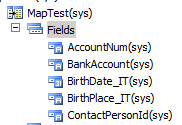
map2
Now the next thing I need to do is to associate the fields in map with the fields in different tables, let say I am taking two tables (CustTable and VendTable).
map3
Notice that above, four fields that I have created in Maps also exist in CustTable as well as VendTable with different names.
To associate fields, go to Mapping node, right click it and click New mapping, and enter the table that you want to associate in Mapping Table field. Like
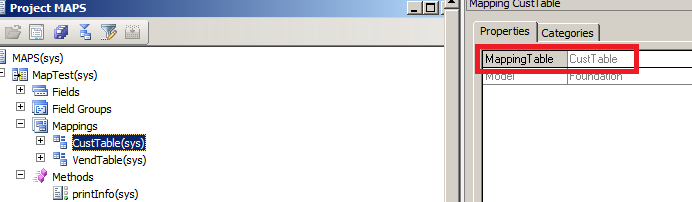
map4
And the associate fields with fields in MAP
map5
Now I have created a method called printInfo under method node in Maps, which print the value of the map field AccNumber.
public void printInfo()
{
info(strFmt(“Map : AccountNum :%1″,this.AccNumber));
}
Similiarly I have create same methods under method nodes of CustTable and VendTable which are printing their respective AccountNumber fields
map7 map8
Now finally I have created a job see below I  am not describing every line  added comments above the line.
map9
When I run this job see what happens
map10

21 Aug 2013

Maps + AX 2012

mapping different fields with the same EDT from different tables to each other.

For example let's that you have an a customer Table and a vendors table and
you want to fill in the fields of a new table from these tables.

If maps did not exist you would have to do this in your new table:

void initFromCustTable(CustTable _custTable)
{
this.AccountNum = _custTable.AccountNum;
this.Name = _custTable.Name;
this.country = _custTable.Country;
this.language = _custTable.Language;
}

AND

void initFromCustTable(VendTable _vendable)
{
this.AccountNum = _vendable.AccountNum;
this.Name = _vendable.Name;
this.country = _vendable.Country;
this.language = _vendable.Language;
}

BUT

if you use a map (mapping newTable, CustTable and Vendor) all you need is
this:

void initFromCustVendMap(CustVendMap _custVendMap)
{
this.AccountNum = _custVendMap.AccountNum;
this.Name = _custVendMap.Name;
this.country = _custVendMap.Country;
this.language = _custVendMap.Language;
}
ONLY once on the map and then you just call the same method with different
buffers:

this.initFromCustVendMap(YourCustTableBuffer);
this.initFromCustVendMap(YOurVendTableBuffer); // NOTE same method but
different buffer.

Some more Examples On Maps

The X++ Job Code

static void MapJob()
{
MapDevice mDevice;
TabClock tClock;
TabPhone tPhone;
;
// 1: Call the method as it is implemented on the map.
mDevice.doubleTheVoltage("Testing");

// 2: Twice, call a method that is defined in the AOT under MapDevice > Methods.
mDevice.getTheVoltage();
mDevice.MapDevice::getTheVoltage();

// 3: Activate the TabClock mapping on the map.
mDevice = tClock;

// 4: Set fields that are defined in the AOT under MapDevice > Fields.
mDevice.brandName = "Contoso";
mDevice.batteryVoltage3 = 9;

// 5: Call an inherited method. The toString method returns "Class xRecord".
print mDevice.toString();

// 6: Call a method that is defined in the AOT only under MapDevice > Methods.
mDevice.MapDevice::getTheVoltage();

// 7: Call the method as it is implemented on the table.
mDevice.doubleTheVoltage("Testing");
}


Create number sequence in D365 FO

Create the data type. Add code in the loadModule method of the appropriate NumberSeqModule subclass. Add a method to the module’s paramet...