static void AssignRoleToUser(Args _args)
{
SecurityRole role;
SecurityUserRole userRole;
boolean added;
UserInfo userInfo;
Name userRoleName;
UserId userId;
container userRoleContainer;
int counter;
userId = 'AXAPTAEXPLORER';
userRoleContainer = conIns(userRoleContainer, 1, "Budget clerk");
userRoleContainer = conIns(userRoleContainer, 2, "Budget manager");
userRoleContainer = conIns(userRoleContainer, 3, "Buying agent");
for (counter = 1; counter <= conLen(userRoleContainer); counter++)
{
userRoleName = conPeek(userRoleContainer, counter);
select role where role.Name == userRoleName;
if (role.RecId)
{
while select userInfo
where userInfo.id == userId
{
select * from userRole
where userRole.SecurityRole == role.RecId
&& userRole.User == userInfo.id;
if (!userRole || (userRole.AssignmentStatus != RoleAssignmentStatus::Enabled))
{
userRole.User = userInfo.id;
userRole.SecurityRole = role.RecId;
userRole.AssignmentMode = RoleAssignmentMode::Manual;
userRole.AssignmentStatus = RoleAssignmentStatus::Enabled;
SecuritySegregationOfDuties::assignUserToRole(userRole, null);
info(strFmt('Role %1 added to the user %2 successfully.', role.Name, userInfo.id));
}
else
{
warning(strFmt('skipping – Role %1 already assigned to the user %2.', role.Name, userInfo.id));
}
}
}
}
}
Showing posts with label security. Show all posts
Showing posts with label security. Show all posts

6 Jul 2017
Get all privileges,duties from Roles to Excel through code + AX 2012
static void getallrolesrespectdutiesandprivileges(Args _args)
{
SecurityTaskEntryPoint taskEntryPoint;
SecurityRole role;
SecurityRoleTaskGrant taskGrant;
SecuritySubTask subTask;
SecurityTask privilege;
SecurityTask securityTask;
SecurableObject securableObject;
DictEnum dictEnum;
SysExcelApplication application;
SysExcelWorkbooks workbooks;
SysExcelWorkbook workbook;
SysExcelWorksheets worksheets;
SysExcelWorksheet worksheet;
SysExcelCells cells;
SysExcelCell cell;
int row;
str privAOTName;
str dutyAOTName;
str privName;
str dutyName;
str entrName;
str accessLevel;
str menuItemType;
FromTime startTime = timeNow();
// EXCEL Header
application = SysExcelApplication::construct();
workbooks = application.workbooks();
workbook = workbooks.add();
worksheets = workbook.worksheets();
worksheet = worksheets.itemFromNum(1);
cells = worksheet.cells();
cells.range('A:A').numberFormat('@');
cell = cells.item(1,1);
cell.value("Role AOT name");
cell = cells.item(1,2);
cell.value("Description");
cell = cells.item(1,3);
cell.value("Duty AOT name");
cell = cells.item(1,4);
cell.value("Description");
cell = cells.item(1,5);
cell.value("Privilidge AOT name");
cell = cells.item(1,6);
cell.value("Description");
cell = cells.item(1,7);
cell.value("Entry Point");
cell = cells.item(1,8);
cell.value("Type");
cell = cells.item(1,9);
cell.value("Access level");
row = 1;
while select taskEntryPoint
join subTask
where subTask.SecuritySubTask == taskEntryPoint.SecurityTask
join taskGrant
where taskGrant.SecurityTask == subTask.SecurityTask
join role
where role.RecId == taskGrant.SecurityRole
{
menuItemType = "";
dutyAOTName = "";
dutyName = "";
privAOTName = "";
privName = "";
if (subTask.RecId)
{
switch (taskEntryPoint.PermissionGroup)
{
case AccessRight::View:
accessLevel = "Read";
break;
case AccessRight::Edit:
accessLevel = "Update";
break;
case AccessRight::Add:
accessLevel = "Create";
break;
case AccessRight::Delete:
accessLevel = "Delete";
break;
default:
accessLevel = "";
break;
}
}
select privilege
where privilege.RecId == taskGrant.SecurityTask
&& SecurityTaskType::Duty == privilege.Type;
dutyAOTName = privilege.AotName;
dutyName = privilege.Name;
select privilege
where privilege.RecId == subTask.SecuritySubTask
&& SecurityTaskType::Privilege == privilege.Type;
privAOTName = privilege.AotName;
privName = privilege.Name;
select RecId, Type, Name from securableObject
where securableObject.RecId == taskEntryPoint.EntryPoint && (securableObject.Type == SecurableType::MenuItemDisplay
|| securableObject.Type == SecurableType::MenuItemAction || securableObject.Type == SecurableType::MenuItemOutput);
dictEnum = new DictEnum(enumNum(MenuItemType));
menuItemType = dictEnum.index2Name(securableObject.Type);
row++;
cell = cells.item(row, 1);
cell.value(role.AotName);
cell = cells.item(row, 2);
cell.value(role.Name);
cell = cells.item(row, 3);
cell.value(dutyAOTName);
cell = cells.item(row, 4);
cell.value(dutyName);
cell = cells.item(row, 5);
cell.value(privAOTName);
cell = cells.item(row, 6);
cell.value(privName);
cell = cells.item(row, 7);
cell.value(securableObject.Name);
cell = cells.item(row, 8);
cell.value(menuItemType);
cell = cells.item(row, 9);
cell.value(accessLevel);
}
while select SecurityTask, SecurityRole from taskGrant
join RecId, Type, AOTName from securitytask where securityTask.RecId == taskGrant.SecurityTask
&& taskGrant.SecurityRole == taskGrant.SecurityRole
&& securitytask.Type == SecurityTaskType::Privilege
join securityTask, EntryPoint from taskEntryPoint
where taskEntryPoint.SecurityTask == securitytask.RecId
{
menuItemType = "";
dutyAOTName = "";
dutyName = "";
privAOTName = "";
privName = "";
select RecId, Type, Name from securableObject
where securableObject.RecId == taskEntryPoint.EntryPoint &&
(securableObject.Type == SecurableType::MenuItemDisplay || securableObject.Type == SecurableType::MenuItemAction
|| securableObject.Type == SecurableType::MenuItemOutput);
if(securableObject)
{
select privilege where privilege.RecId == securityTask.RecId
&& SecurityTaskType::Privilege == privilege.Type;
privAOTName = privilege.AotName;
privName = privilege.Name;
dictEnum = new DictEnum(enumNum(MenuItemType));
menuItemType = dictEnum.index2Name(securableObject.Type);
row++;
cell = cells.item(row, 1);
cell.value(role.AotName);
cell = cells.item(row, 2);
cell.value(role.Name);
cell = cells.item(row, 3);
cell.value(dutyAOTName);
cell = cells.item(row, 4);
cell.value(dutyName);
cell = cells.item(row, 5);
cell.value(privAOTName);
cell = cells.item(row, 6);
cell.value(privName);
cell = cells.item(row, 7);
cell.value(securableObject.Name);
cell = cells.item(row, 8);
cell.value(menuItemType);
cell = cells.item(row, 9);
cell.value(accessLevel);
}
}
CodeAccessPermission::revertAssert();
info(strFmt("Total time: %1", timeConsumed(startTime, timeNow())));
}
{
SecurityTaskEntryPoint taskEntryPoint;
SecurityRole role;
SecurityRoleTaskGrant taskGrant;
SecuritySubTask subTask;
SecurityTask privilege;
SecurityTask securityTask;
SecurableObject securableObject;
DictEnum dictEnum;
SysExcelApplication application;
SysExcelWorkbooks workbooks;
SysExcelWorkbook workbook;
SysExcelWorksheets worksheets;
SysExcelWorksheet worksheet;
SysExcelCells cells;
SysExcelCell cell;
int row;
str privAOTName;
str dutyAOTName;
str privName;
str dutyName;
str entrName;
str accessLevel;
str menuItemType;
FromTime startTime = timeNow();
// EXCEL Header
application = SysExcelApplication::construct();
workbooks = application.workbooks();
workbook = workbooks.add();
worksheets = workbook.worksheets();
worksheet = worksheets.itemFromNum(1);
cells = worksheet.cells();
cells.range('A:A').numberFormat('@');
cell = cells.item(1,1);
cell.value("Role AOT name");
cell = cells.item(1,2);
cell.value("Description");
cell = cells.item(1,3);
cell.value("Duty AOT name");
cell = cells.item(1,4);
cell.value("Description");
cell = cells.item(1,5);
cell.value("Privilidge AOT name");
cell = cells.item(1,6);
cell.value("Description");
cell = cells.item(1,7);
cell.value("Entry Point");
cell = cells.item(1,8);
cell.value("Type");
cell = cells.item(1,9);
cell.value("Access level");
row = 1;
while select taskEntryPoint
join subTask
where subTask.SecuritySubTask == taskEntryPoint.SecurityTask
join taskGrant
where taskGrant.SecurityTask == subTask.SecurityTask
join role
where role.RecId == taskGrant.SecurityRole
{
menuItemType = "";
dutyAOTName = "";
dutyName = "";
privAOTName = "";
privName = "";
if (subTask.RecId)
{
switch (taskEntryPoint.PermissionGroup)
{
case AccessRight::View:
accessLevel = "Read";
break;
case AccessRight::Edit:
accessLevel = "Update";
break;
case AccessRight::Add:
accessLevel = "Create";
break;
case AccessRight::Delete:
accessLevel = "Delete";
break;
default:
accessLevel = "";
break;
}
}
select privilege
where privilege.RecId == taskGrant.SecurityTask
&& SecurityTaskType::Duty == privilege.Type;
dutyAOTName = privilege.AotName;
dutyName = privilege.Name;
select privilege
where privilege.RecId == subTask.SecuritySubTask
&& SecurityTaskType::Privilege == privilege.Type;
privAOTName = privilege.AotName;
privName = privilege.Name;
select RecId, Type, Name from securableObject
where securableObject.RecId == taskEntryPoint.EntryPoint && (securableObject.Type == SecurableType::MenuItemDisplay
|| securableObject.Type == SecurableType::MenuItemAction || securableObject.Type == SecurableType::MenuItemOutput);
dictEnum = new DictEnum(enumNum(MenuItemType));
menuItemType = dictEnum.index2Name(securableObject.Type);
row++;
cell = cells.item(row, 1);
cell.value(role.AotName);
cell = cells.item(row, 2);
cell.value(role.Name);
cell = cells.item(row, 3);
cell.value(dutyAOTName);
cell = cells.item(row, 4);
cell.value(dutyName);
cell = cells.item(row, 5);
cell.value(privAOTName);
cell = cells.item(row, 6);
cell.value(privName);
cell = cells.item(row, 7);
cell.value(securableObject.Name);
cell = cells.item(row, 8);
cell.value(menuItemType);
cell = cells.item(row, 9);
cell.value(accessLevel);
}
while select SecurityTask, SecurityRole from taskGrant
join RecId, Type, AOTName from securitytask where securityTask.RecId == taskGrant.SecurityTask
&& taskGrant.SecurityRole == taskGrant.SecurityRole
&& securitytask.Type == SecurityTaskType::Privilege
join securityTask, EntryPoint from taskEntryPoint
where taskEntryPoint.SecurityTask == securitytask.RecId
{
menuItemType = "";
dutyAOTName = "";
dutyName = "";
privAOTName = "";
privName = "";
select RecId, Type, Name from securableObject
where securableObject.RecId == taskEntryPoint.EntryPoint &&
(securableObject.Type == SecurableType::MenuItemDisplay || securableObject.Type == SecurableType::MenuItemAction
|| securableObject.Type == SecurableType::MenuItemOutput);
if(securableObject)
{
select privilege where privilege.RecId == securityTask.RecId
&& SecurityTaskType::Privilege == privilege.Type;
privAOTName = privilege.AotName;
privName = privilege.Name;
dictEnum = new DictEnum(enumNum(MenuItemType));
menuItemType = dictEnum.index2Name(securableObject.Type);
row++;
cell = cells.item(row, 1);
cell.value(role.AotName);
cell = cells.item(row, 2);
cell.value(role.Name);
cell = cells.item(row, 3);
cell.value(dutyAOTName);
cell = cells.item(row, 4);
cell.value(dutyName);
cell = cells.item(row, 5);
cell.value(privAOTName);
cell = cells.item(row, 6);
cell.value(privName);
cell = cells.item(row, 7);
cell.value(securableObject.Name);
cell = cells.item(row, 8);
cell.value(menuItemType);
cell = cells.item(row, 9);
cell.value(accessLevel);
}
}
CodeAccessPermission::revertAssert();
info(strFmt("Total time: %1", timeConsumed(startTime, timeNow())));
}
10 Apr 2015
Restrict user login + AX 2012
Following Code in startupPost method of info class in AOT
void startupPost()
{
// To restrict user login form second login
xSession session;
SysClientSessions SysClientSessions;
UserId currentUserId;
int counter;
;
currentUserId = curUserId();
if(currentUserId!="Admin")// Allow Admin User to login multiple time
{
while select SysClientSessions
where SysClientSessions.userId == currentUserId &&
SysClientSessions.Status == 1 // 1 : Login 0 : Logout
{
session = new xSession(SysClientSessions.SessionId, true);
if (session && session.userId())
{
counter++;
}
}
if(counter>=2)
{
Box::stop("Already Logged-in : The same user id can't log in twice.");
infolog.shutDown(true);
}
}
}
11 Apr 2014
Override permissions in a Role
I recently came across a trick on setting up security in AX 2012. We wanted to create a new role by copying an existing role and removing a few duties from the role. I managed copying the role through some coding and that went well. However, when I tested the new role, it doesn't behave exactly the same as the original role. After poking around a bit, I found this nice new function in AX 2012 "Override Permissions" on the role form. As Microsoft noted, "Overrides for securable objects are not associated with specific duties or privileges. If you apply an override, the access level for the object is set for the role, regardless of access levels specified by the duties and privileges assigned to that role." I found this is better and easier than changing the duties or privilege itself.


You can also go to the AOT and look up in the table SecurityRolePermissionOverride and see what permissions are overridden.

One last note, you don't want to override too many permissions as it'll slow down your system performance.
New things on AX 2012 security settings.
Unlike AX 2009, any change from the Security Role/Privileges form (e.g. adding a new role, adding/removing a duty from a role) auto triggers a change on the AOT under the Security section! If you're working from a usr layer (as a regular functional consultant would do), the changes will be on the USR layer!! I learned this in a hard way as I found all my security settings gone after a recent code deployment. So, if you don't want to keep redo your security settings in AX 2012, log onto the CUS layer and do the configuration, or merge the code after you're done on the USR layer.
Another way to duplicate an existing role is to go to AOT>Security>Roles and duplicate the role. Then all duties and permissions will get copied to the new role. Much better.


You can also go to the AOT and look up in the table SecurityRolePermissionOverride and see what permissions are overridden.

One last note, you don't want to override too many permissions as it'll slow down your system performance.
New things on AX 2012 security settings.
Unlike AX 2009, any change from the Security Role/Privileges form (e.g. adding a new role, adding/removing a duty from a role) auto triggers a change on the AOT under the Security section! If you're working from a usr layer (as a regular functional consultant would do), the changes will be on the USR layer!! I learned this in a hard way as I found all my security settings gone after a recent code deployment. So, if you don't want to keep redo your security settings in AX 2012, log onto the CUS layer and do the configuration, or merge the code after you're done on the USR layer.
Another way to duplicate an existing role is to go to AOT>Security>Roles and duplicate the role. Then all duties and permissions will get copied to the new role. Much better.
28 Oct 2013
Security – AX 2012
The extensible data security framework is a new feature in Microsoft Dynamics AX 2012 that enables developers and administrators to secure data in shared tables such that users have access to only the part of the table that is allowed by the enforced policy. This feature can be used in conjunction with role-based security (also supported in Microsoft Dynamics AX 2012) to provide more comprehensive security than was possible in the past.
Extensible data security is an evolution of the record-level security (RLS) that was available in earlier versions of Microsoft Dynamics AX. Extensible data security policies, when deployed, are enforced, regardless of whether data is being accessed through the Microsoft Dynamics AX rich client forms, Enterprise Portal webpages, SSRS reports, or .NET Services [MS help]
simple example:
Requirement is to show a particular user only those Bank accounts that belongs to the Bank group “BankCNY”
Below are the Bank accounts that are available in my system. By using policy framework on roles , I can restrict user to view only bank accounts that belong to Bank group “BankCNY”

First of all , where are these policies in AX? They are actually in the AOT >> Security >> Policies

Before we create policies, we need to create a query to use it in policies. Remember, try to optimize the queries to the best otherwise it might lead to performance issues.
To keep it very simple, Create a Query by name SR_BankAccountTable by adding data source[PrimaryTable] as “BankAccountTable” and add a range on BankGroupId field and set it to “BankCNY” as shown below

Now let us create a new Role by name SR_BankController as shown below
Go to AOT >> Security >> Roles >> New Role

Set the following properties of the newly created role by right clicking and going to properties

Now lets create duties for this role: In this example I will create one simple duty called “SR_BankAccountsMaintain”
Go to AOT >> Security >> Duties >> Right click >> New Duty

Set the following properties for the newly create duty. Name it as “SR_BankAccountsMaintain” and provide label and description as shown below

Now, let us create a new privilege and add entry points [Menu Items] to it to provide only access to the user
Go to AOT >> Security >> Privilege >> New Privilege.

Name the privilege as “SR_BankAccountTableMaintain” and set the label and Description as shown below
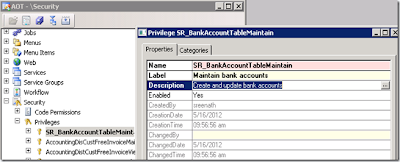
Now drag and drop some menu items on to Entry points from AOT >> Menu Items >> Display as shown below

Now add this newly created privilege “SR_BankAccountTableMaintain” to the duty “SR_BankAccountMaintain” which we have created.

Then, add SR_BankAccountsMaintain duty to the Role SR_BankController

Now, let us create a new Policy by name “SR_BankAccountPolicy” and set the properties as shown below

Set the below properties

In the above screen, Select the context type as “RoleName“ and the role “SR_BankController” and select the query as ”SR_BankAccountTable”
PrimaryTable : should always be the first data source Table which you have added in the query. So, select BankAccountTable
A constrained table is the table or tables in a given security policy from which data is filtered or secured, based on the associated policy query. For example, in a policy that secures all sales orders based on the customer group, the Sales Order table would be the constrained table. Constrained tables are always explicitly related to the primary table in the policy [MS Help]
A policy context is a piece of information that controls the circumstances under which a given policy is considered to be applicable. If this context is not set, then the policy, even if enabled, is not enforced.
Contexts can be of two types: role contexts, and application contexts. A role context enables policy application based on the role or roles to which the user has been assigned. An application context enables policy application based on information set by the application
we are almost done, we need to add this role= to some user and verify whether he is able to see only Bank accounts that belongs to BankCNY group
Go to System Administration >> Users >> select any user >> Click on Assign roles.
Select “Bank Accounts controller” and click on Ok Button.

Now , let us log in with the user credentials for which we have assigned the new Role and verify the Bank accounts.
As you see, the user can only see the Bank accounts which belong to “BankCNY” group.

Extensible data security is an evolution of the record-level security (RLS) that was available in earlier versions of Microsoft Dynamics AX. Extensible data security policies, when deployed, are enforced, regardless of whether data is being accessed through the Microsoft Dynamics AX rich client forms, Enterprise Portal webpages, SSRS reports, or .NET Services [MS help]
simple example:
Requirement is to show a particular user only those Bank accounts that belongs to the Bank group “BankCNY”
Below are the Bank accounts that are available in my system. By using policy framework on roles , I can restrict user to view only bank accounts that belong to Bank group “BankCNY”

First of all , where are these policies in AX? They are actually in the AOT >> Security >> Policies
Before we create policies, we need to create a query to use it in policies. Remember, try to optimize the queries to the best otherwise it might lead to performance issues.
To keep it very simple, Create a Query by name SR_BankAccountTable by adding data source[PrimaryTable] as “BankAccountTable” and add a range on BankGroupId field and set it to “BankCNY” as shown below

Now let us create a new Role by name SR_BankController as shown below
Go to AOT >> Security >> Roles >> New Role

Set the following properties of the newly created role by right clicking and going to properties

Now lets create duties for this role: In this example I will create one simple duty called “SR_BankAccountsMaintain”
Go to AOT >> Security >> Duties >> Right click >> New Duty

Set the following properties for the newly create duty. Name it as “SR_BankAccountsMaintain” and provide label and description as shown below

Now, let us create a new privilege and add entry points [Menu Items] to it to provide only access to the user
Go to AOT >> Security >> Privilege >> New Privilege.

Name the privilege as “SR_BankAccountTableMaintain” and set the label and Description as shown below

Now drag and drop some menu items on to Entry points from AOT >> Menu Items >> Display as shown below

Now add this newly created privilege “SR_BankAccountTableMaintain” to the duty “SR_BankAccountMaintain” which we have created.

Then, add SR_BankAccountsMaintain duty to the Role SR_BankController

Now, let us create a new Policy by name “SR_BankAccountPolicy” and set the properties as shown below
Set the below properties

In the above screen, Select the context type as “RoleName“ and the role “SR_BankController” and select the query as ”SR_BankAccountTable”
PrimaryTable : should always be the first data source Table which you have added in the query. So, select BankAccountTable
A constrained table is the table or tables in a given security policy from which data is filtered or secured, based on the associated policy query. For example, in a policy that secures all sales orders based on the customer group, the Sales Order table would be the constrained table. Constrained tables are always explicitly related to the primary table in the policy [MS Help]
A policy context is a piece of information that controls the circumstances under which a given policy is considered to be applicable. If this context is not set, then the policy, even if enabled, is not enforced.
Contexts can be of two types: role contexts, and application contexts. A role context enables policy application based on the role or roles to which the user has been assigned. An application context enables policy application based on information set by the application
we are almost done, we need to add this role= to some user and verify whether he is able to see only Bank accounts that belongs to BankCNY group
Go to System Administration >> Users >> select any user >> Click on Assign roles.
Select “Bank Accounts controller” and click on Ok Button.

Now , let us log in with the user credentials for which we have assigned the new Role and verify the Bank accounts.
As you see, the user can only see the Bank accounts which belong to “BankCNY” group.

15 May 2013
New Improvements in Data Security AX-2012
The new version of AX offers many new features to all of us. These go from development improvements to data security, which is the one topic I would like to focus on in this post.
The following are the improvements with regard to data security:
Role-based security
Server-enforced security
Extensible data security framework
Flexible authentication
Role-based security
Data security is much easier to manage. In AX 2012, users are assigned to roles based on the duties and responsibilities they have and access is granted based on those roles. This change puts an end to the tedious and time-consuming process of assigning users based on application objects. Once set up, role assignments can easily be updated based on the business data.
Server-enforced security
Authorization is performed on the server rather the client, consistently enforcing permissions on protected fields regardless of the type of client. The server sends the client only the information that the user has been granted access to, resulting in increased data security.
AX 2009 did not offer the facility to use data security based on effective date. However, in AX 2012 administrators can specify whether users have access to past, present, or future records with different levels of access, which creates much for flexibility to all the different iteration in the use of data throughout the life of the application.
Further, the new version can also be used to create data security policies based on data contained in a different table.
For example, in previous versions you could not filter sales lines by customer location because those were stored in different tables, but the new version makes that totally possible.
Data security policies are enforced at the server regardless of the type of client used to access the data.
Flexible authentication
Authentication of users by methods other than Active Directory allowing external users to access Dynamics AX without a required domain account.
The following are the improvements with regard to data security:
Role-based security
Server-enforced security
Extensible data security framework
Flexible authentication
Role-based security
Data security is much easier to manage. In AX 2012, users are assigned to roles based on the duties and responsibilities they have and access is granted based on those roles. This change puts an end to the tedious and time-consuming process of assigning users based on application objects. Once set up, role assignments can easily be updated based on the business data.
Server-enforced security
Authorization is performed on the server rather the client, consistently enforcing permissions on protected fields regardless of the type of client. The server sends the client only the information that the user has been granted access to, resulting in increased data security.
AX 2009 did not offer the facility to use data security based on effective date. However, in AX 2012 administrators can specify whether users have access to past, present, or future records with different levels of access, which creates much for flexibility to all the different iteration in the use of data throughout the life of the application.
Further, the new version can also be used to create data security policies based on data contained in a different table.
For example, in previous versions you could not filter sales lines by customer location because those were stored in different tables, but the new version makes that totally possible.
Data security policies are enforced at the server regardless of the type of client used to access the data.
Flexible authentication
Authentication of users by methods other than Active Directory allowing external users to access Dynamics AX without a required domain account.
5 Apr 2013
Not enough rights to use table 'Signature log' (SIGSignatureLog)
ERROR: “Not enough rights to use table 'Signature log' (SIGSignatureLog).”

SOLUTION:Administration > Setup > System > Configuration and tick the Electronic Signature tick box

SOLUTION:Administration > Setup > System > Configuration and tick the Electronic Signature tick box
22 Mar 2013
Security Keys in Ax
Dynamics Ax provides following keys to provide the security for application
1.License Keys :
First Level Security , specifies what all featues/modules/developemnt tools we can access in the standard product.License Keys will be used after installation to unlock the product.License Keys will be issued by the microsoft for partners/vendors to develop vertical/generic solutions.
2.Configuration Keys :
Second Level Security , To Enable/Disable the object/feature for all the users.
3.Security Keys :
If you want to enable/disable object/features to group of users.
4. Record Level security :
Basically it deals with the data , if you want to restrict the viewing of records per user group than we setup record level security.
1.License Keys :
First Level Security , specifies what all featues/modules/developemnt tools we can access in the standard product.License Keys will be used after installation to unlock the product.License Keys will be issued by the microsoft for partners/vendors to develop vertical/generic solutions.
2.Configuration Keys :
Second Level Security , To Enable/Disable the object/feature for all the users.
3.Security Keys :
If you want to enable/disable object/features to group of users.
4. Record Level security :
Basically it deals with the data , if you want to restrict the viewing of records per user group than we setup record level security.
Subscribe to:
Posts (Atom)
-
 how you can disable a form element, based on the value of another form element. As example, the CustTable form will be used. The examp...
 -
Dialogbutton dialogButtonConfirm; ; dialogButtonConfirm = Box::yesNo("continue ", dialogButton::Yes, ...
-
AXAPTA History Axapta 1.0 Development of Axapta began in 1983 at Danish company Damgaard Data A/S. The first version of Axapta (pr...